We get asked about email marketing tools more than almost anything else. Most articles on this topic read like they were written by the tools’ own marketing teams, so we went through the actual documentation, current pricing, and feature sets ourselves instead of taking any platform’s word for it.
Here are the real questions small business owners ask about AI email marketing tools, answered with what these tools actually do rather than what their landing pages promise.
Getting Started With AI Email Tools
Which AI email tool is best if I am just starting?

Mailchimp is the most beginner-friendly option in this category. Its AI Content Optimizer reviews your draft against industry benchmarks and suggests subject lines, send times, and content length adjustments. The free plan includes basic AI subject line suggestions, though it caps out at 500 email sends and 250 contacts, which is enough to test the tool but not to run it long-term.
If you want the AI features without committing to Mailchimp’s pricier paid tiers, Brevo offers its AI Assistant, including subject line generation, free on every plan, including the free tier. For a freelancer or very small business just getting started, that free-plan access matters more than a longer feature list.
Do I need to be technical to use these tools?
No. Both platforms are built for a non-technical user—drag-and-drop editors, plain-language automation builders, and one-click AI suggestions rather than anything requiring code or a learning curve. This is one area where the marketing claims and the actual product experience line up.
What AI Can (and Can’t) Do For Your Emails
Will AI actually save me time, or is it another tool I need to babysit?
Both platforms genuinely automate parts of the process rather than just suggesting text for you to review manually. Mailchimp’s send-time optimization uses machine learning to determine the best delivery time per subscriber based on their historical open behavior, so you are not guessing at send times. Brevo does the same and also offers basic automated segmentation suggestions.
Where the time savings are real: you stop manually testing subject lines and guessing send times yourself. Where they are not: setting up multi-step automation sequences still takes deliberate configuration time upfront, regardless of what any platform’s marketing copy implies.
Will AI-written emails sound robotic?
This is a legitimate concern, and the honest answer is: yes, if you use the AI output unedited. Every AI content generator across these platforms (e.g., Mailchimp, Brevo, GetResponse) produces a starting draft, not a finished email. The tools are explicit about this in their own documentation; they are positioned as content assistants, not full replacements for a human editing pass.
Our recommendation: use the AI draft as a first pass, then edit for your own voice before sending. Treat it the same way you would treat a junior copywriter’s first draft.
Will AI replace the need to understand email marketing myself?
No, and this is worth being direct about. These tools handle pattern-recognition tasks; for example, which subject lines tend to perform better, what time your specific subscribers tend to open emails, and which segment is more likely to convert. What they cannot do is understand your brand, decide what your business should actually say, or build a relationship with your reader. The strategic thinking still has to come from you.
Can these tools work with an email list I already have?
Yes. Both Mailchimp and Brevo support importing existing subscriber lists and will apply behavioural segmentation (grouping subscribers by what they have opened, clicked, or purchased) once you have accumulated enough send history for the AI to have data to work with. Neither tool can meaningfully segment a list on day one; they need a few campaigns’ worth of engagement data first.
Working With Your Existing List
Can these tools help if I am not a confident writer?
Yes, this is one of the stronger use cases. GetResponse, Mailchimp, and Brevo all offer AI email drafting where you describe what you want in a sentence or two and receive a starting draft. The honest caveat from question 3 applies here, too: edit before sending, always.
Results, Timelines, and Common Mistakes
How long before I see meaningful results?
Every platform in this category needs a data-gathering period before its AI recommendations become genuinely useful; a handful of campaigns’ worth of send and open data. Judging a tool’s AI features after a single campaign will give you a misleading picture either way. Give it at least three to four sends before deciding whether the recommendations are actually improving your results.
Do the AI subject line tools actually help?
Subject line optimisation is genuinely one of the more mature AI features in this category; both Mailchimp and Brevo have refined this feature over several product cycles. It is consistently cited as one of the more reliable AI features in independent platform reviews. That said, neither platform publishes verified, audited before-and-after data for individual small businesses, and we have not run our own controlled test on this either. Treat any specific percentage improvement you see quoted elsewhere with caution, including in older versions of this article.
What is the most common mistake people make with these tools?
Trying to configure a fully built-out automation sequence before sending a single real campaign. Start with one feature that addresses your actual biggest problem, usually subject lines or send timing, run it for a few campaigns, then add complexity. This mirrors general small-business software adoption advice, not something specific to email tools.
Final Thought: AI Email Marketing Tools Are Your Secret Weapon (Not a Replacement)
After using these tools for 9 months, I’ve learned one thing: AI doesn’t replace your marketing skills—it amplifies them. The magic happens when you combine AI’s data power with your human creativity and understanding of your customers.
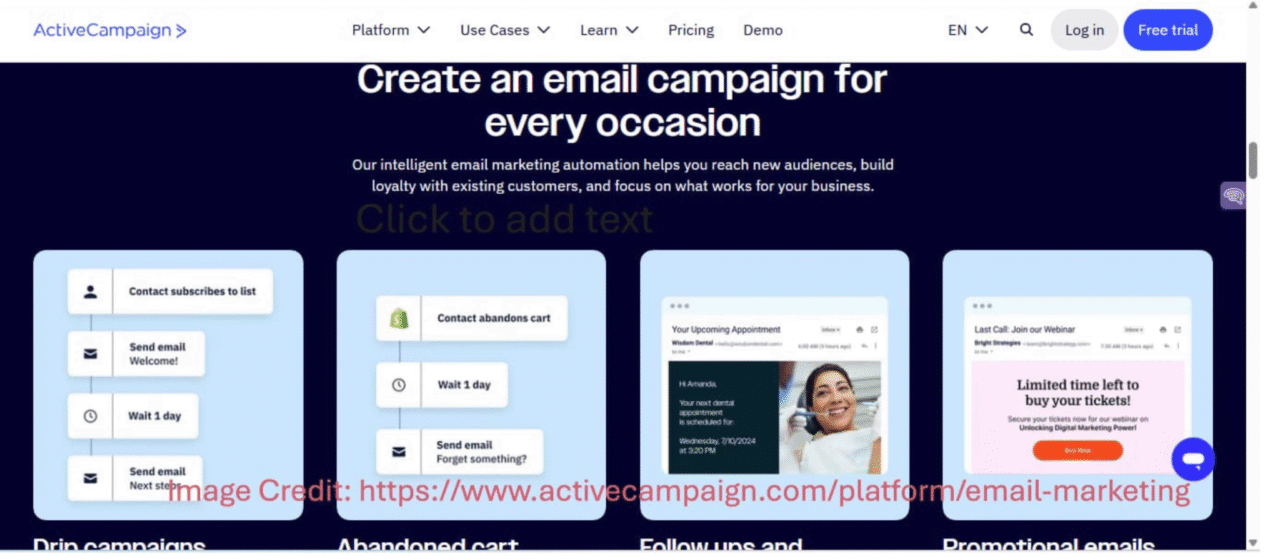
So pick one tool, start with one feature, and see what happens. And if you’re still sending “Newsletter #47” emails… well, we’ve all been there. The good news? It’s never too late to start fresh. Here is the list of AI email marketing tools I tried:
Got a question I didn’t cover? Write your question in the comments. I’ll answer it personally! 😊
Want to see how AI transforms every part of your marketing game from emails to social media?
Head to AI for Marketing and Sales in 2026: Boost Engagement & Conversions, which is packed with examples, real tools, and insights that help small businesses grow smarter.
Your Action Plan: Start Today, Not Someday
You don’t need to overhaul your entire email setup at once. A simpler approach works better:
- Pick one pain point: open rates, writing time, or segmentation are the three most common starting points.
- Choose one tool from this list that addresses it directly.
- Set it up. Most of these features take under 20 minutes to activate.
- Run it across three campaigns before judging whether it’s working. A single send isn’t enough data for the AI, or for you, to draw a real conclusion.
If you’re not sure where to start, subject line optimization is usually the fastest win: it requires the least setup and gives you a signal within your very next send.
The Takeaway: Great emails aren’t about sending more. They’re about sending with purpose.
Author’s Note
I’m Barnali. The author of this article.
Why am I exploring tools like AI for freelancers?
Here’s the twist: I’ve started using this technology for my freelancing projects, and it’s opened doors to grow my small business. Working with it feels like turning a rough draft into a solid business plan—bringing scattered ideas into focus. Here on this website, I’m sharing my experience to guide you, and you can count on me to bring the insight and trust to make aiappdomain.com your go-to spot!
Please see the Author page.
Reader’s Note: Let’s Talk Smarter Email Marketing
Email marketing is thriving because it’s evolving. AI is handling the heavy lifting of timing, tone, and targeting, making emails feel personal, not robotic. The question isn’t “Should I use AI?” but “How can I use it to crush my metrics?”
So, what’s the single biggest email marketing challenge you’ve faced this year? Is it writing subject lines that actually get clicked, or perfecting the send frequency?
Drop your question or your best tip below—your input will help someone else solve the exact same problem!
References & Credits
Credit is given to the respective sources and websites linked throughout this post for the data, examples, and insights used here.
Disclaimer
This blog post is meant to inform and educate in a general sense. It does not replace tailored advice from legal, financial, or technical experts.
A Few Important Notes:
- Examples given (like AI chatbots or predictive analytics) show possible uses of AI, not guaranteed results. Every business is different.
- Stats and trends come from credible sources, but AI evolves fast. What is true today might shift tomorrow—always double-check the latest updates.
- Ethics and compliance are touched on briefly (e.g., privacy concerns and workforce impact), but this is not legal advice. When adopting AI, consult experts to stay compliant.
- Tools mentioned are for context, not recommendations. Research thoroughly to find what works for your needs.
- Success with AI depends on execution: the quality of your data, how well you implement solutions, and how prepared your team is.
By reading this, you agree:
- Any use of AI strategies or tools is your responsibility.
- The author and publisher are not liable for decisions made based on this content.
- Links to external sites are for convenience only—we do not vouch for their content.
- This disclaimer may be updated without notice.
The Takeaway: AI optimizes your emails, but only you can make them meaningful. Think of this post as a starting point, not a roadmap. Always adapt ideas to your unique situation!